
Open a project. Ask for anything.
Issue 06 · Oct 9, 2026
Open a project. Ask for anything.
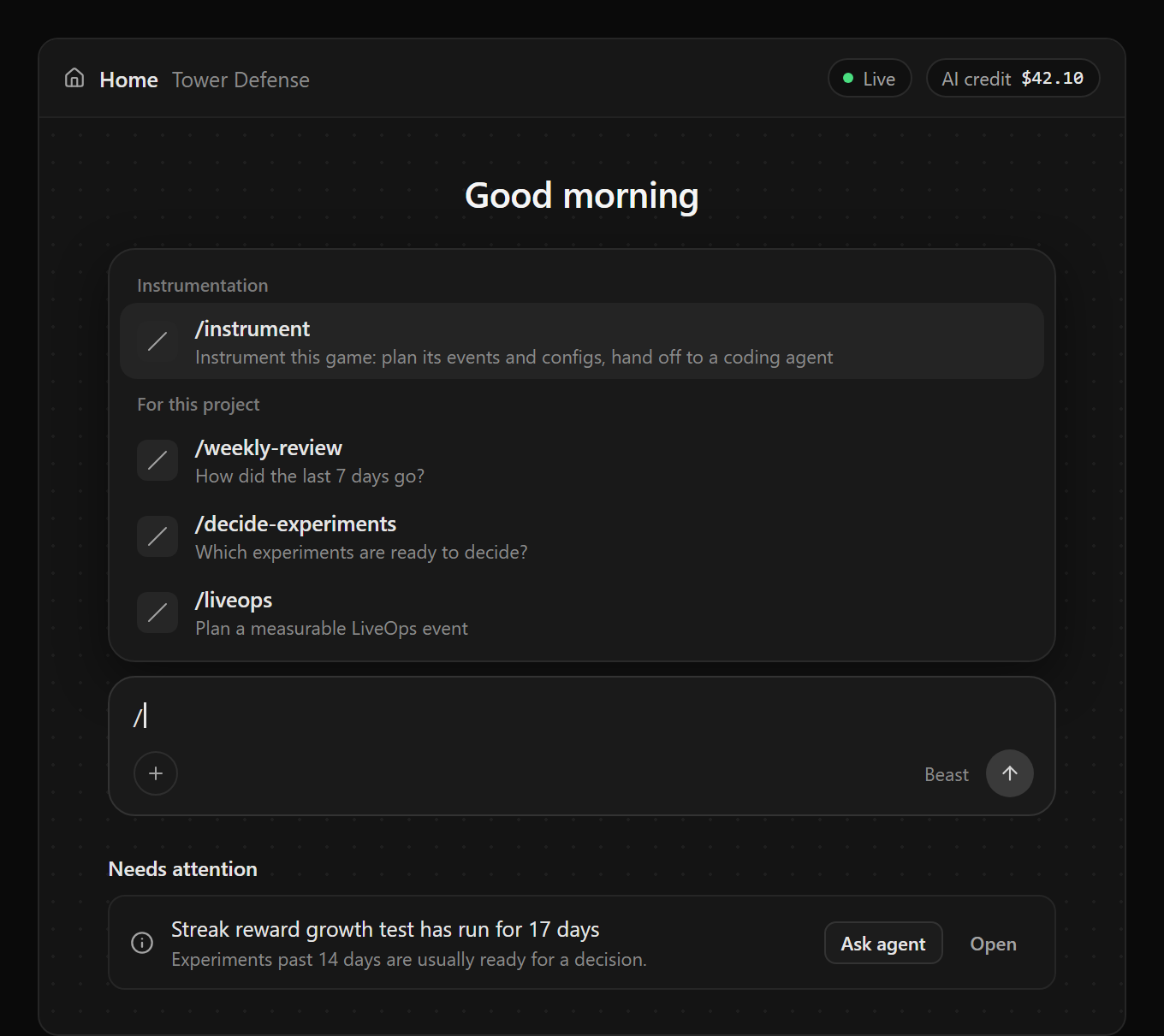
Opening a project now lands on Home, with the Gamebeast assistant built in. Ask a question and it finds the events, runs the query, and explains the answer. Ask for a change and it proposes one for you to approve.
- Commands for the big jobs. Type / for playbooks like
/instrument,/weekly-review,/decide-experiments, and/liveops. The same commands work in Cursor and Claude Code over MCP, so you can start a playbook from your editor too. - It flags, you decide. Needs attention lists only what your data backs: an experiment ready for a call, events that stopped arriving, events that don’t match your plan. Ask agent drafts the prompt with the facts in it. Nothing runs until you send it.
- A plan before a big job. For multi-step work it shows its steps and the changes it expects, then waits for Run plan. Anything players would notice still comes to you as a card.
- It follows you. Press Cmd+I (Ctrl+I on Windows) on any page to keep the same conversation open beside your work.
The assistant runs on AI credits, and free organizations start with $5. Connecting your own agent over MCP is always free.
Instrument your game: events and configs
Type /instrument in the assistant or over MCP and it plans what your game should track and what it should be able to tune. Events become a tracking plan; values like prices, rewards, and timers become a proposed configuration. Click Implement with… on the plan to hand both to Cursor, Claude Code, Codex, Roblox Studio, Unity, or any agent connected over MCP. It adds the events to your code and wires those values to the configuration, so your game is ready to experiment on.
Then play-test. Each event moves from Implemented to Receiving to Verified, anything that doesn’t match the plan is flagged, and the agent checks the configuration holds your game’s real values. It all runs against your development environment, so production data stays clean.
Exclusive experiments, for a clean read
Turn on Exclusive experiment when you create one and its players stay out of every other running experiment: nobody already in another test joins, and nobody who joins is added to another while it runs. No one is moved, and it can’t be changed after creation. On a busy game, expect it to fill more slowly.
Legacy experiments end October 21. Moving on Roblox needs SDK 1.0.0, which is in final testing. It’s taking a little longer than we said last week, and we’ll let you know the moment it’s out.
Two new ways to read a funnel
Two weeks ago our build log queued funnels as a table. They’re here, plus a second new display:
- Funnel Table. Counts, completion, churn, and conversion for every step, with Users and Sessions tabs. Expand a breakdown row to follow it through the funnel.
- Flowed Steps. A funnel shape with each step’s value and conversion always on show, no hovering. The column chart stays as Funnel Steps.
Smaller things worth knowing
Describe your data. Configurations and their keys, markers and their arguments, and cohorts can all carry a description now. The assistant reads them to pick the right one, and can write them for you. Queries and dashboards are next.
Heatmaps for agents. The assistant and MCP agents can query heatmaps and look at the map itself, so they tell you where the hotspots are.
Cohorts over MCP. Agents can save, edit, describe, and delete cohorts, and cohort conditions can now use All time.
Annual Beast tier. Monthly Beast-tier plans can switch to annual at 20% off from the Upgrade page.
On the horizon
ranked cohorts and experiments v2 targeting
- Ranked cohorts. Build cohorts from where players rank, not just fixed thresholds: the top 1% of spenders, the bottom quartile by playtime. Gamebeast calculates the cutoff for you.
- Cohort targeting returns in experiments v2. Legacy experiments had it, and it won’t be lost in the move: run a test on just the players in a cohort, like new players or your top spenders, and keep everyone else out of it.
autopilot
- In issue 01 we said we were building agents that work towards goals you set. This is that. Give Autopilot a goal, like better day-7 retention or even custom analytics, plus the limits it works within. It watches your data, finds what’s worth acting on, and stays quiet when nothing is.
- You choose how far it goes for each goal. It can advise, sending fully designed experiments for you to approve. It can test, running its own experiments within your limits and pausing any that hurt a guardrail metric. Or it can operate, rolling winners out in stages.
- When a fix needs code, it writes the change request and hands it to your coding agent over MCP. Further out, Gamebeast will connect to your GitHub directly and own that step end to end, up to a pull request you review and merge. A weekly briefing covers what it learned, what it shipped, and the lift it measured.