
Find your top 1%. Then test on them.
Issue 07 · Oct 14, 2026
Find your top 1%. Then test on them.
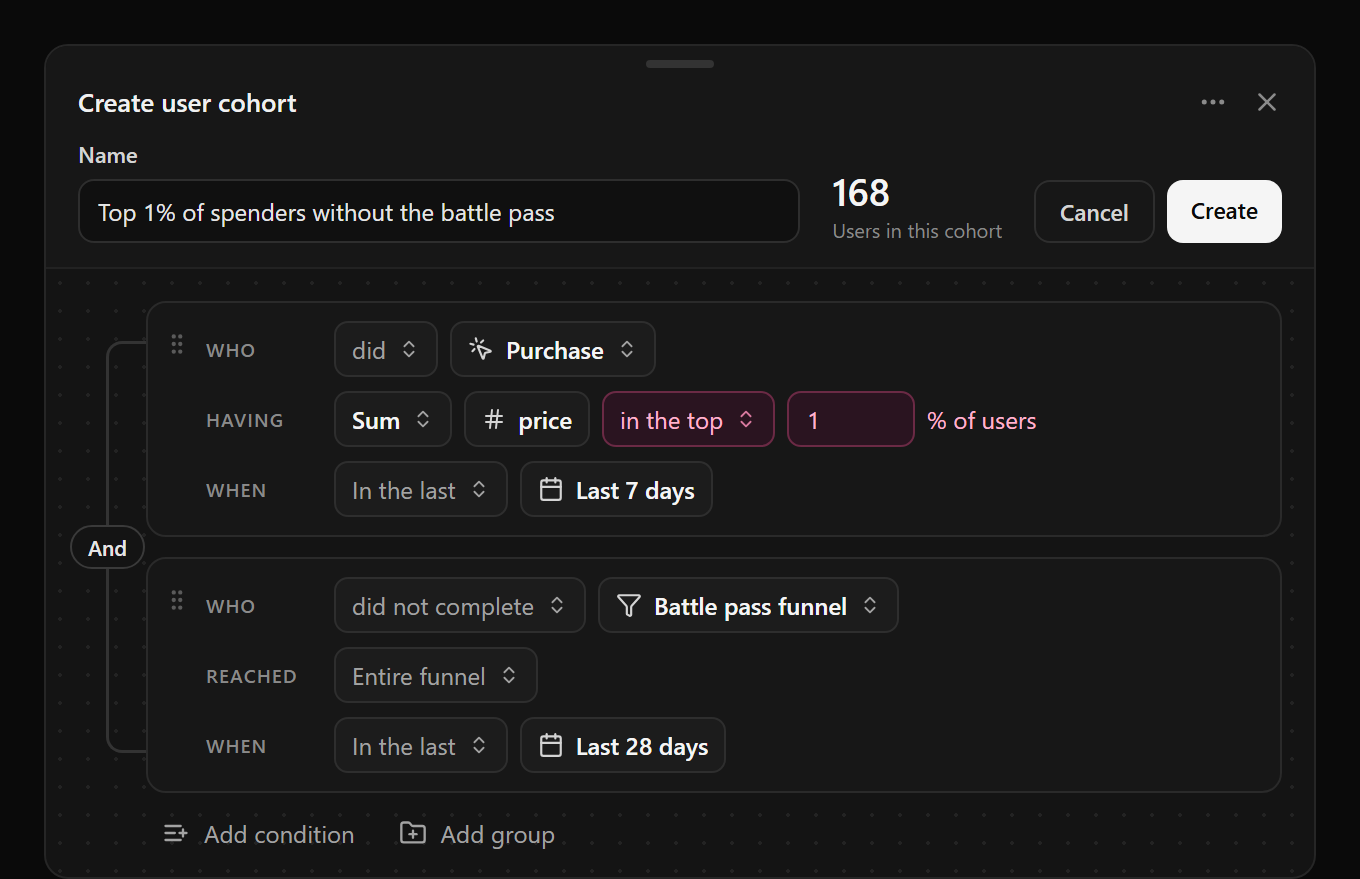
Last week’s build log said ranked cohorts were next. They’re here, along with a rebuilt cohort editor and new kinds of conditions. Cohorts can now describe users by how they compare to everyone else, not just by fixed numbers.
- Ranked against your users. Pick the top or bottom share of users for any measure, like the top 1% of spenders. Or compare to a typical user: more than twice the average, or below the median. Gamebeast works out the cutoff from your data.
- Funnels, deeplinks, and experiments. Build a cohort from users who completed a saved funnel, or reached a given step of it. Or from users who opened a deeplink, or who are in an experiment, down to the group.
- A builder you can read. Each condition reads as a sentence: who, having, when. Nest groups, drag conditions to reorder them, and resize the editor to give your rules room. The member count stays in view as you edit.
Roblox SDK 1.0.0 is out
Version 1.0.0 moves the Roblox SDK onto our latest API, and it’s what experiments v2 needs on Roblox. Legacy experiments end October 21, so upgrade before moving yours. Thanks for your patience while we tested it.
- Several configurations. Read from any configuration by its alias, name, or ID:
Configs:Get({ "MyConfig", "spawn", "rate" }). - Several experiments at once. A user can be in more than one experiment.
GetAssignmentsForPlayer()returns them all. - Targeting built in. The SDK sends device, input type, country, language, and place for targeting. Set your own user and server properties to target on those too.
1.0.0 has breaking changes. Config paths now start with the configuration, the Events and Jobs
services are gone, and GetGroupForPlayer() gives way to GetAssignmentsForPlayer(). The release
notes walk through the upgrade.
Target an experiment at a cohort
Cohort targeting is back, now in experiments v2. In the Audience step, add a cohort to include or exclude its users. Pair it with a ranked cohort and you can test a price change on just your top spenders.
Gamebeast works out each cohort’s members before the experiment starts, and starts it automatically once they’re ready. The experiment page shows when each targeted cohort was last computed. Targeting on cohorts needs no SDK changes, and the Audience step tells you which conditions do.
Moving a legacy experiment that used a cohort filter? Target the same cohort in its replacement.
Smaller things worth knowing
A guide to deeplinks. A new deeplinks guide covers link types, launch data, and analytics, with a demo you can click through.
MCP setup starts where you are. Settings → MCP & API access now picks the project and environment you’re viewing, and the sign-in page fits on smaller screens.
PIN-protect a shared dashboard. Turn on Require PIN in the share menu, and anyone with the link needs the PIN before any of the dashboard loads. Change or remove it at any time.
Install with Forest. The Roblox SDK can be installed with Forest as well as Wally.
On the horizon
histograms, the web SDK, and community pulse
- Histograms. A chart for how a value is spread across users, not just its average.
- The web SDK. The same configs, experiments, and analytics for browser games and web builds, out of early access.
- Community Pulse for everyone. User feedback from the channels you already run, grouped by topic and sentiment, for every studio.